 Türkçe
 Destinations
All Destinations
Explore eSIM plans available in 150+ countries. Search and compare prices.


















































































































































How it works
Get online in 4 steps
Check your phone
Make sure your device supports eSIM. Most phones from 2019+ do.
Download Rivio, start from $1.25
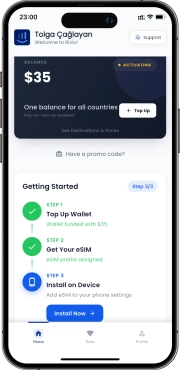
Install the app and start with free data. No card required.
Install your eSIM
Follow the in-app steps. Takes about 2 minutes.
Top up when you need more
Add balance in the app. Use it on this trip and the next.
Reviews
What travelers say after using Rivio
Real comments from people who used Rivio on actual trips.
"The single eSIM feature is a lifesaver. Once you set up one eSIM you can use it in all countries without needing to set it up again. Highly recommend for frequent travelers, and the live support helps very quickly on any issue."
saytyr
App Store Review
"If you're using an eSIM app for the first time, this might be the best one. Once you open the app, it guides you through everything simply without making you wonder what to do. The best part is using your balance across all countries, not just one."
demettoprak
App Store Review
"Tried it in many European countries. Works flawlessly everywhere. Unlike other eSIMs, you don't need to install separately for each country — install once and use everywhere. You can track how much balance you've spent and where."
Tugcegk
App Store Review
FAQ
Questions before you travel?
Find clear answers about activation, free trial, coverage, and supported phones.
How does pricing work?
Rivio uses a straightforward pay-as-you-go model. There are no monthly subscriptions, fixed bundles, or hidden fees. You add balance to your account, and it decreases only when you use mobile data. Whatever you do not use carries over indefinitely — your balance never expires.
Here is how topping up works:
- Open the Rivio app, tap “Add Balance,” and choose an amount. Top-up options start at $5 and go up to $100 in a single transaction.
- All balances and data rates are displayed in USD. If your payment method uses a different currency, your bank handles the conversion at its standard rate.
- We accept Visa, Mastercard, American Express, Apple Pay, and Google Pay. Payments are processed securely through Stripe.
You can enable auto-reload in the app so your account tops up automatically (for example, $10 or $25) whenever your balance drops below a threshold you choose. This is useful on longer trips so you never run out of data unexpectedly.
Every new account receives a $1.25 trial balance at signup — no credit card required. That is enough for roughly 500 MB in most countries, giving you a real chance to test the service before spending anything.
For receipts, the app emails a confirmation after every top-up. You can also view your full transaction history and download PDF invoices from the “Billing” section inside the app. Business travelers can update their billing details in account settings before downloading.
Which countries does Rivio cover?
Rivio provides data coverage in over 150 countries spanning six continents. You use the same single eSIM profile everywhere — there is no need to install a new one each time you cross a border.
Here is a snapshot of coverage by region:
- Europe: All 27 EU member states plus the UK, Switzerland, Norway, Turkey, and more. Popular destinations like France, Germany, Spain, and Italy are covered with rates starting at $2.45/GB.
- Asia-Pacific: Japan, South Korea, Thailand, Singapore, India, Australia, New Zealand, and dozens more.
- Americas: United States, Canada, Mexico, Brazil, Argentina, Colombia, and most of Central America and the Caribbean.
- Africa: South Africa, Kenya, Egypt, Morocco, Nigeria, and a growing list of additional countries.
- Middle East: UAE, Saudi Arabia, Israel, Qatar, and others.
Rivio uses a pay-as-you-go pricing model, which means each country has its own per-GB rate and you only pay for the data you consume. There are no bundles to choose from and no data caps to worry about — your balance simply decreases as you use data.
To check the exact rate for a specific country, open the Rivio app and visit the Destinations section, or browse the destinations page on our website. Each listing shows the current per-GB price, supported network types (4G/LTE or 5G where available), and partner carrier information. Rates are displayed in USD and updated regularly to reflect the best available pricing.
How do I set up my eSIM?
Setting up your Rivio eSIM is straightforward and takes about two minutes. Here is the step-by-step process:
- Download the Rivio app from the App Store (iOS 15+) or Google Play (Android 10+).
- Create an account and receive your $1.25 trial balance instantly — no credit card needed.
- Tap “Install eSIM” in the app. You will see a QR code on screen.
- Scan the QR code or, if you prefer, tap “Enter Details Manually” and copy-paste the activation codes provided in the app.
- Once the profile downloads, label it something clear like “Rivio Travel Data” so you can identify it later.
Tips for a smooth setup:
- Install before you travel. Set up the eSIM at home over Wi-Fi and activate data roaming once you land. You will be connected the moment you arrive.
- On iOS, go to Settings > Cellular > your Rivio plan and enable “Turn On This Line” plus “Data Roaming.” Make sure Rivio is selected as the line for Cellular Data.
- On Android, go to Settings > Network & Internet > SIMs, select your Rivio profile, and enable “Mobile Data” and “Roaming.” The exact path may vary by manufacturer (Samsung, Pixel, OnePlus, etc.).
- Keep your primary SIM active for calls and texts. The eSIM handles data only, so your home number stays reachable.
- If the QR code scan fails, restart the app and try again, or use the manual entry option.
Does my phone support eSIM?
Most smartphones released from 2019 onward include eSIM support. Here are the most common compatible devices:
- Apple: iPhone XS, XR, and every model since (including the iPhone 15 and 16 lineup), iPad Pro (3rd gen+), iPad Air (3rd gen+), iPad mini (5th gen+)
- Samsung: Galaxy S20 through S24 series, Galaxy Z Fold and Z Flip (all generations), Galaxy Note 20+, Galaxy A54 5G
- Google: Pixel 3 and every Pixel since, including Pixel 8 and Pixel 9 series
- Other brands: Motorola Razr (2019+), OPPO Find X3+, Huawei P40+, Sony Xperia 1 IV+, Nokia X30, and select Xiaomi models
The quickest way to confirm compatibility is to download the Rivio app. During setup, it automatically detects whether your device supports eSIM.
You can also check manually:
- iOS: Go to Settings > General > About. If you see “Available SIM” or “EID,” your device supports eSIM.
- Android: Go to Settings > Network & Internet > SIMs. If you see “Add eSIM” or “Download SIM,” you are good to go. You can also dial *#06# — if an EID number appears, eSIM is supported.
Carrier lock matters. Even if your hardware supports eSIM, a carrier lock can block third-party profiles like Rivio. To check, insert a SIM from a different carrier. If it fails, contact your carrier and request an unlock — in many countries, carriers must unlock devices once the contract ends or the phone is paid off. Once unlocked, Rivio installs without restrictions.
What is an eSIM?
An eSIM (embedded SIM) is a digital SIM chip built directly into your phone’s hardware. Instead of buying a physical SIM card at an airport kiosk or waiting for one to arrive in the mail, you download a data profile to your device in under two minutes. The technology follows the GSMA standard adopted by Apple, Samsung, Google, and dozens of other manufacturers since 2018.
With a traditional SIM, you need to pop out a tiny card, swap it, and risk losing your home number while abroad. An eSIM eliminates all of that. Your physical SIM stays in place for calls and texts, while the eSIM handles mobile data on a separate line. Most modern phones support at least one eSIM alongside a physical SIM, and newer models like the iPhone 15 and Samsung Galaxy S24 support multiple eSIM profiles simultaneously.
What makes Rivio different from other eSIM providers:
- One global profile covers 150+ countries. You install it once and never need to download a new eSIM for each destination.
- Pay-as-you-go pricing means you only pay for the megabytes you actually use, with data rates starting as low as $2.45/GB in popular destinations.
- Your balance never expires, so leftover credit carries over to your next trip.
- Setup takes about two minutes through the Rivio app, with no paperwork, contracts, or commitments required.
My data is not working. What should I check?
If your data is not working after installing the eSIM, work through this checklist in order. Most issues resolve within the first three steps.
Step 1 — Verify your eSIM settings:
- Turn on Data Roaming for your Rivio line (Settings > Cellular on iOS, or Settings > Network & Internet > SIMs on Android).
- Turn off Data Roaming on your primary SIM to avoid charges from your home carrier.
- On iOS, enable Allow Cellular Data Switching. On Android, set Rivio as the active data SIM.
Step 2 — Restart your device. This forces the phone to re-register on the local network and resolves most initial connection problems.
Step 3 — Check network selection. If you are stuck on 3G or have no signal, turn off automatic network selection in cellular settings. Manually pick a network showing 4G or LTE, then switch back to automatic.
Step 4 — Confirm APN settings. Rivio configures the APN automatically during installation. If data still fails, verify the APN matches the value shown in the Rivio app. On iOS: Settings > Cellular > Rivio line > Cellular Data Network. On Android: Settings > SIMs > Rivio > Access Point Names.
Step 5 — Check your balance. Open the Rivio app and confirm you have sufficient balance. Data stops when your balance hits zero.
If none of these steps help, tap the support chat icon in the Rivio app. Our team is available around the clock and can diagnose issues remotely.
Can I transfer my eSIM to a new phone?
eSIM profiles are tied to the specific device they are installed on and cannot be transferred directly between phones. This is a security requirement of the GSMA eSIM standard, not a Rivio limitation — it applies to every eSIM provider.
If you switch to a new phone, here is what to do:
- Download the Rivio app on your new device and log in with your existing account.
- Tap “Install eSIM” to generate a fresh profile for the new phone.
- Your account balance, usage history, and settings carry over automatically because they are linked to your Rivio account, not the eSIM profile itself.
There is no charge for installing a new profile, and your balance never expires regardless of how many times you switch devices.
A few things to keep in mind:
- You can delete the old eSIM profile from your previous phone at any time through its cellular settings. Deleting it does not affect your account or balance.
- If you use multiple devices (for example, a phone and a tablet), you can install separate Rivio eSIM profiles on each one. Both devices share the same account balance.
- If you are trading in or selling your old phone, remove the Rivio eSIM profile first by going to Settings > Cellular (iOS) or Settings > Network & Internet > SIMs (Android) and deleting the plan.
- Need help during the switch? Rivio’s in-app support chat is available around the clock to walk you through the process.